Today, I tried to rip a copy of the 2009 Star Trek DVD so I could watch it using the projector connected to my PC. I don't have a DVD player at home since, hey, I can play movies with my computer just fine! Or so I thought.
Apparently, the disc is encumbered with some new copy protection scheme and instead of the movie, all I got was an IO error.
Seriously, WTF?! I can't believe movie companies are actually putting time and money in developing new and insidious ways of intentionally breaking their own products. And for what? Certainly not to stop piracy. Had I just downloaded an illegal copy I'd be watching the movie right now.
I've been itching to buy a blu ray player since the prices have come down to something reasonable now, but experiences like this really dampen that enthusiasm. What's the point in buying movies if you're just going to get treated as a criminal anyway? Might as well get the pirate version with all the "don't copy this movie" warnings and copy protection removed. Especially since backing up (or just watching, if you're using Linux) your own discs requires breaking the copy protection which is illegal too.
Saturday, February 27, 2010

Thursday, February 18, 2010
Remote control
Problem: Can't pause/fast forward/rewind video or music while sitting on the couch.
Solution: An IR receiver. Luckily it just so happens, I have an old IRMan lying around (basically a commercial version of [UIR](http://fly.cc.fer.hr/~mozgic/UIR/), albeit long discontinued).
Next problem: The computer is behind the couch, at the other end of the room.
Solution: [Universal IR Receiver Daemon](http://kbinstuff.googlepages.com/uirduniversalirreceiverdaemon). This neat little utility supports the UIR protocol and can send the IR codes over a network as UDP packets. Neat! Now I can connect the IRMan to my conveniently located home server which relays the button codes to my desktop PC.
Next problem: No receiver daemon!
Solution: A simple python script listens for incoming UDP packets, checks if the code matches an action defined in a configuration file, then executes that action. Currently amarok and mplayer are supported. Get the script at the [software odds & ends](http://www.luolamies.org/software/misc/) page.
Final problem: UIRD doesn't want to connect to my IRMan. Solution: Apparently a delay in the initialization routine was too short. Changing "usleep( 1000);" to "usleep( 10000)" in init_irmodule.c seemed to fix the it.
Solution: An IR receiver. Luckily it just so happens, I have an old IRMan lying around (basically a commercial version of [UIR](http://fly.cc.fer.hr/~mozgic/UIR/), albeit long discontinued).
Next problem: The computer is behind the couch, at the other end of the room.
Solution: [Universal IR Receiver Daemon](http://kbinstuff.googlepages.com/uirduniversalirreceiverdaemon). This neat little utility supports the UIR protocol and can send the IR codes over a network as UDP packets. Neat! Now I can connect the IRMan to my conveniently located home server which relays the button codes to my desktop PC.
Next problem: No receiver daemon!
Solution: A simple python script listens for incoming UDP packets, checks if the code matches an action defined in a configuration file, then executes that action. Currently amarok and mplayer are supported. Get the script at the [software odds & ends](http://www.luolamies.org/software/misc/) page.
Final problem: UIRD doesn't want to connect to my IRMan. Solution: Apparently a delay in the initialization routine was too short. Changing "usleep( 1000);" to "usleep( 10000)" in init_irmodule.c seemed to fix the it.
Saturday, December 5, 2009
The N900 is sweet
About two weeks ago I received my shiny new N900 mobile computer. This is the latest model in Nokia's internet tablet series, which includes the 770, the N800 and N810. Unlike its predecessors, the N900 now also works as a phone. I had previously owned only the 770, so the switch to the latest model was quite a leap.
The 770 was released almost exactly four years ago, and if you put it side by side with the N900 it becomes obvious that much progress has been made. The N900 is slightly smaller, albeit thicker and heavier, but it easily fits in a pocket. It lacks the screen protector though, so some kind of a carrying case or pouch is a must to avoid scratches. N900 still uses a resistive touch screen, meaning no multi-touch. The screen feels similar to the one in the N97 phone and is clearly optimized for use with a finger, whereas 770 was best used with a stylus.
The slide-out keyboard is much faster to use than 770's virtual keyboard, although this feature was actually introduced in the previous N810 model already. For short texts, the finger friendly virtual keyboard is also quite fast to use now.
The software side has seen great improvements as well. The UI in general looks very modern and feels much snappier and more responsive than the 770's. Especially the web browser is much nicer. Being Firefox based, it renders pages just like on a desktop PC. The flash player has been updated and it can now even play Youtube videos. Most importantly, the new browser is fast! Visiting a large page with the 770 would lock up the browser, whereas the N900 is snappy and smooth even on JavaScript heavy pages like Slashdot.
Another cool thing is that the N900 comes with an X terminal built-in and sudo gainroot.sh is all it takes to get root access. This is something most "regular" users probably won't care about, but I for one appreciate it when the manufacturer actually lets me do what I want with the hardware I bought, rather than actively discourage it.
The N900 is by no means perfect though. Syncing the calendar or address book with Ovi is not supported, which is odd considering how much Nokia promotes it. There's even a Ovi Store icon in the application menu, which just brings up a page saying the Ovi store for maemo is not open yet. Ovi maps is strangely limited. It takes ages to load and hogs the whole screen while doing so, meaning I can't switch to some other app while it loads. Basic features like voice navigation and location bookmarking are missing and the maps seem to be a bit out of date.
At first glance, the actual phone functionality seems almost like its hidden. It becomes clearer, however, when you understand that the N900 is not a phone with a built-in computer, but a computer with a built-in phone. With this in mind, the phone features (including Skype, Google talk and SIP) become easy, even intuitive, to use.
Despite the problems, many of which will undoubtably be fixed in future updates, I would say the N900 is an excellent mobile computer/phone. Is it the iPhone killer? No. In terms of ease of use, the iPhone is still miles ahead. But N900 is the phone for engineers and nerds.
Monday, March 2, 2009
Arduino
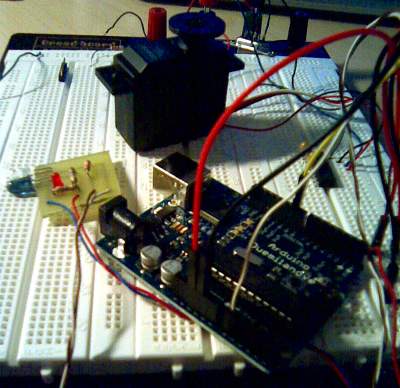
From a quick peek over at Hack a Day and other electronics blogs it seems like everyone and their cat are doing Arduino projects nowadays. I finally caved in and decided to see what all the fuss is about, and ordered an Arduino Duemilanove from sparkfun, which arrived today. I've only had it for a few hours now, and I already love it. Arduino, together with a breadboard and sparkfun's premium M/M jumper wires equals prototyping bliss ;) With help from the sample programs that comes with the Arduino IDE, I managed to put together a quick IR-reflector controlled servo test thingy in just a couple of minutes with no prior experience with the platform. Doing the same with a PIC would have taken me much longer, despite my greater experience with them.
Installing the PC software was fairly straightforward, even though I run 64 bit gentoo on my desktop. I followed the gentoo instructions and just had to replace the bundled Rxtx.so with a link to the one provided by the distribution. The FTDI driver I had compiled earlier, so the rest was plug and play.
Thursday, February 26, 2009
Software odds and ends
Decided to upload some old, but not entirely useless, old programs I've written. You can find them at the odds and ends page. They are not really usable pieces of software, but might serve as a starting point or inspiration for someone. Currently, I have three programs up:
- Animtext: A text animation creation tool. I wrote this back in high school (or the Finnish equivalent) to generate the end credits sequence for a student film project. Perfect for cheesy amateur hacker films!
- powermate qt test: A Qt4 based test program for the Griffin Powermate. Accesses the powermate via Linux event interface. (powermate driver is in the official kernel tree)
- tablet qt test: A Qt4 test program for (wacom) tablets. Useful for checking if Qt (or X) tablet support is configured properly.
Sunday, September 28, 2008
DrawPile 0.5.0
A new DrawPile release is out, little less than two weeks after I resumed the project. This was mainly a bug fix release, introducing a new more stable and robust server and fixing many bugs and usability problems in the client.
The 0.5.0 release has one new major feature: an annotation tool. The annotation tool is pretty much like the text tool in other drawing programs, except the text always floats above the actual image. Because DrawPile doesn't have its own image format (yet), the annotations cannot be saved. They can, however, be burned onto the image (in offline mode only, more on that below.)
With this maintenance release out of the way, next up is more features!
Drawing long lines, especially thin ones, causes nasty jaggies as DrawPile doesn't support subpixel brushes at the moment. This is going to change in the next release. The latest SVN trunk already contains some preliminary subpixel drawing code. Here is how it compares to the old DrawPile and GIMP:

A pen tool that always draws with 100% hardness and no antialiasing will be added, so pixel editing will still be possible. Another new feature that will probably make it to the next release is composition modes. (Add, multiply, darken, lighten and such)
At the moment, DrawPile's tile engine isn't really being used for anything you couldn't do with a huge contiguous image. Splitting the image into tiles makes it possible (or rather, easier) to do some cool things. For example, tiles make it fairly easy to efficiently implement layers. Having layer support means we can also do things like indirect drawing.
Indirect drawing means drawing into a temporary layer first, then compositing the whole stroke onto the image at the same time. This mode seems to be the default on most other drawing programs. Indirect drawing makes it possible to paint with uniform opacity and, in DrawPile's case, removes the need for preview strokes.
There's also one other thing tiles make fairly easy to do: Undo. Unfortunately, it's not that obvious how undo should work in a multiuser environment, so that's one feature DrawPile isn't getting quite yet.
Finally, as mentioned above, the annotation tool currently cannot burn the text onto the image while connected to a network session. The problem is that there is no way to guarantee that each participant of the session has the same font and the same font rendering engine. For example, on Linux Qt uses freetype, while on Windows it uses GDI.
There is a way around this problem though. When a user decides to bake an annotation, instead of just telling others to do the same, DrawPile sends the rasterized text to the other users and they composite that instead of whatever they have. There are still some practical problems that must be worked out with this approach, but this is most likely the way to go. Incidentally, adding support for sending arbitrary raster data as drawing commands also enables features such as pasting from a clipboard.
The 0.5.0 release has one new major feature: an annotation tool. The annotation tool is pretty much like the text tool in other drawing programs, except the text always floats above the actual image. Because DrawPile doesn't have its own image format (yet), the annotations cannot be saved. They can, however, be burned onto the image (in offline mode only, more on that below.)
With this maintenance release out of the way, next up is more features!
Drawing long lines, especially thin ones, causes nasty jaggies as DrawPile doesn't support subpixel brushes at the moment. This is going to change in the next release. The latest SVN trunk already contains some preliminary subpixel drawing code. Here is how it compares to the old DrawPile and GIMP:
A pen tool that always draws with 100% hardness and no antialiasing will be added, so pixel editing will still be possible. Another new feature that will probably make it to the next release is composition modes. (Add, multiply, darken, lighten and such)
At the moment, DrawPile's tile engine isn't really being used for anything you couldn't do with a huge contiguous image. Splitting the image into tiles makes it possible (or rather, easier) to do some cool things. For example, tiles make it fairly easy to efficiently implement layers. Having layer support means we can also do things like indirect drawing.
Indirect drawing means drawing into a temporary layer first, then compositing the whole stroke onto the image at the same time. This mode seems to be the default on most other drawing programs. Indirect drawing makes it possible to paint with uniform opacity and, in DrawPile's case, removes the need for preview strokes.
There's also one other thing tiles make fairly easy to do: Undo. Unfortunately, it's not that obvious how undo should work in a multiuser environment, so that's one feature DrawPile isn't getting quite yet.
Finally, as mentioned above, the annotation tool currently cannot burn the text onto the image while connected to a network session. The problem is that there is no way to guarantee that each participant of the session has the same font and the same font rendering engine. For example, on Linux Qt uses freetype, while on Windows it uses GDI.
There is a way around this problem though. When a user decides to bake an annotation, instead of just telling others to do the same, DrawPile sends the rasterized text to the other users and they composite that instead of whatever they have. There are still some practical problems that must be worked out with this approach, but this is most likely the way to go. Incidentally, adding support for sending arbitrary raster data as drawing commands also enables features such as pasting from a clipboard.
Sunday, September 14, 2008
Continuing work on DrawPile
After a year's hiatus, I decided to start working on DrawPile again.
First thing I did, was rewrite the old server. The new server is QT based (no more other external dependencies) and built as a shared library that can be embedded inside the client and in a tiny standalone shell.
The protocol also underwent a revamp. The new protocol is much more simpler, but also lacks some of the features the old one had (multiple sessions on one server.) The reason I decided to drop these features was that they weren't being used in the client and were and unnecessary complication.
One nice feature the new server has, is the ability to buffer raster data and drawing commands. The server can then efficiently handle new clients with minimal disturbance to other users, and is more robust to boot.
The latest SVN trunk has the new server and a couple of fixes that should make DrawPile much more stable. The drawing code is still slightly broken though. Next up, a new drawing engine, then the 0.5.0 release!
First thing I did, was rewrite the old server. The new server is QT based (no more other external dependencies) and built as a shared library that can be embedded inside the client and in a tiny standalone shell.
The protocol also underwent a revamp. The new protocol is much more simpler, but also lacks some of the features the old one had (multiple sessions on one server.) The reason I decided to drop these features was that they weren't being used in the client and were and unnecessary complication.
One nice feature the new server has, is the ability to buffer raster data and drawing commands. The server can then efficiently handle new clients with minimal disturbance to other users, and is more robust to boot.
The latest SVN trunk has the new server and a couple of fixes that should make DrawPile much more stable. The drawing code is still slightly broken though. Next up, a new drawing engine, then the 0.5.0 release!
Subscribe to:
Posts (Atom)